Integrations · OpenCart
Accept crypto payments in OpenCart 3 and 4
Accept Bitcoin, USDT, Ethereum, Litecoin and TRON in OpenCart 3 and 4. Install the extension, paste the key; the order status follows the payment status.
OpenCart
- OpenCart 3.0 (.ocmod.zip) — The archive is published with the next release — the guide explains installing from the repository.
- OpenCart 4.0 (.ocmod.zip) — The archive is published with the next release — the guide explains installing from the repository.
The CryptoLike extension adds crypto as a payment method in OpenCart 3.0 and 4.0 and moves each order to Processing only after the payment is confirmed on the blockchain. Customers pay in Bitcoin, USDT, Ethereum, Litecoin, TRON or USDC; order statuses, stock and OpenCart's e-mails keep working the way your shop already uses them.
Requirements
There are two packages from one code base, because OpenCart 4 changed the extension layout. Download the one for your OpenCart version from this page.
| OpenCart | Package | PHP | Tested on |
|---|---|---|---|
| 3.0.x | cryptolike-opencart-3.0.ocmod.zip |
7.4 and newer (3.0.3.x only on PHP 7.4) | 3.0.5.1 |
| 4.0.x | cryptolike.ocmod.zip — keep this file name, OpenCart 4 reads the extension code from it |
8.0 – 8.2 | 4.0.2.3 |
OpenCart 4.1 is a separate branch and is not supported yet. Your shop must answer over https:// from the internet so that webhooks reach it.
What the extension does
The extension confirms an order (status Pending, stock and OpenCart's e-mails) only once the CryptoLike payment page exists. If the API cannot be reached, the customer sees "Crypto payment is temporarily unavailable" and can choose another method. After that, only verified webhooks change the order.
- Redirect or embedded page. Send the customer to the CryptoLike payment page, or show it on the store's order status page.
- Coin choice on the payment page, or at the confirm step. Coins offered limits both: on the payment page none ticked means every coin available for invoices in your account.
- Customer texts in the order history, merchant notes (transaction IDs, what to decide) only in the admin, on the order's CryptoLike tab.
- Order statuses of your choice, including "Do not change" for partial, review and expired payments.
- Geo zone and sort order, as for every OpenCart payment method.
- A reconciliation URL for the server cron: it re-reads open payments in case a webhook could not reach the shop.
1. Install the extension
OpenCart 3.0: Admin → Extensions → Installer → upload cryptolike-opencart-3.0.ocmod.zip (no modifications to refresh) → Extensions → Extensions → Payments → CryptoLike → Install → Edit. OpenCart 4.0: Admin → Extensions → Installer → Upload cryptolike.ocmod.zip → Install in the list below → Extensions → Extensions → Payments → CryptoLike → Install → Edit. Installing creates the extension's tables and, if your shop has none, an On hold order status.
2. Connect your CryptoLike account
In the cabinet open Developers → API keys → Create key with the permissions create_invoice and read, and paste the key ID and the secret into the extension's settings; the secret is shown once. Copy the Webhook URL from the settings page, add it in the cabinet under Developers → Webhooks → Add endpoint with every invoice.* event, and paste the endpoint's secret into Webhook secret.
3. Enable the method and test
Press Check connection: "Connected: N currencies available." Set Status to Enabled and save. Then add the Reconciliation URL shown at the bottom of the settings to the server's cron every 15 minutes. Before going live, switch on test mode with a ck_test_ key and the test API URL in API URL (the default is production; ask CryptoLike support for the test URL): test keys work with test networks and coins without value; a live key is refused in test mode.
What happens to an order
| Payment | Order history (customer) | Merchant note (admin, CryptoLike tab) |
|---|---|---|
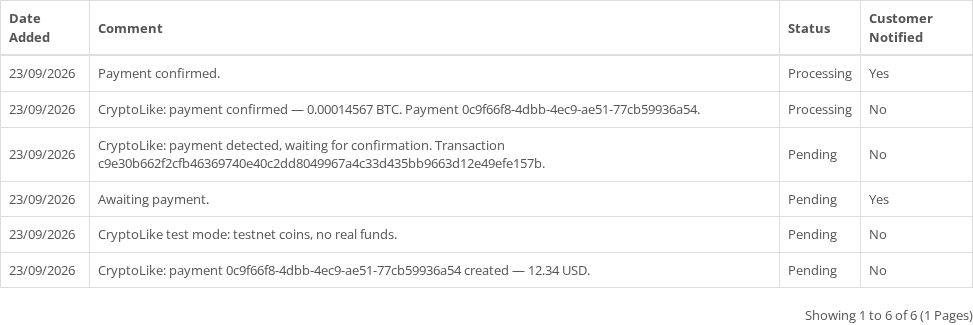
| Transfer detected | — | The transaction ID |
| Confirmed | Processing and "Payment confirmed." (customer notified) | Amount and payment ID |
| Partial payment, before the deadline | On hold and how much is missing, to the same address, until when | What arrived, what is missing |
| Late, partial after the deadline, second payment, reversal, changed order total | On hold (review) | What to decide; never Processing automatically |
| Expired | Canceled, or unchanged (setting) | Payment ID |
The time to pay is your account setting (30 minutes by default) unless you set another value. If OpenCart's mail fails while a webhook changes the status, the status and the customer's text are still written without the e-mail: a broken mailbox never keeps a paid order unpaid.
The same payment-to-order rules apply on every platform; the other shop platforms are compared in crypto payments for online stores.
Screenshots
Troubleshooting
| You see | What to do |
|---|---|
| The order stays Pending after paying | The settings page shows the time of the last verified webhook. None: the webhook does not reach the shop. Check public https:// access and switch off maintenance mode (it lets only signed-in admins through); check that the webhook secret belongs to that endpoint. |
| "Crypto payment is not available for XYZ" | XYZ is not among the currencies enabled for your account (by default USD, EUR, UAH, GBP and CAD). Switch the store to one of them, or write to support. |
| "Connection failed: auth.…" | auth.invalid_key or auth.invalid_signature: wrong key ID or secret. auth.ip_not_allowed: the key's IP whitelist does not include your server. auth.test_key: a ck_test_ key with the default API URL; test mode also needs the test API URL. |
| The embedded page does not load | Add the shop's address in the cabinet under Settings → Integration → Allowed origins. |
The log is system/storage/logs/cryptolike.log and never holds secrets, signatures, webhook bodies or customer data. Uninstalling deletes the settings, both secrets and the extension's tables; the order history stays.
For developers
The extension follows the shared CryptoLike plugin contract: the payment is created from the server with one open payment per order (idempotency_by_order_id), the webhook signature is checked over the raw body, events are deduplicated by event_id, and the extension answers 200 only after the order is written. Language files for English, Spanish, Ukrainian and Russian ship in the archive together with a developer README.
FAQ
What happens if the customer pays less than the order total?
The order moves to On hold and the customer's order history shows how much is missing, to which address and until when. The merchant note on the CryptoLike tab records what arrived. If the rest comes before the deadline, the order becomes Processing; after the deadline it stays in review for your decision: ship, ask for the rest or refund.
What if the customer pays after the payment expired?
The funds are credited to your CryptoLike balance and the order goes to your review status (On hold), never straight to Processing. The note tells you what arrived. You decide whether to fulfil the order or refund the customer with a payout from the cabinet.
How do refunds work?
Refunds are not automatic, because a blockchain transfer cannot be pulled back. Ask the customer for an address and send the amount as a payout from the CryptoLike cabinet. The estimate shows the platform fee and the network fee before you confirm; current rates are on the pricing page.
Which store currency can I use?
The extension creates each payment in the order's currency: USD, EUR, UAH, GBP or CAD. CryptoLike converts it into the coin at the current rate and locks that rate until the payment expires. The currency must be enabled for payments in your account; otherwise the checkout shows "Crypto payment is not available" for it.
Can I test the extension without real money?
Yes. Turn on test mode, save a ck_test_ key and enter the test API URL that CryptoLike support gives you. Test keys work with test networks, and test coins have no value. The form refuses a live key in test mode and a test key in live mode, and saves nothing in that case, so a live shop never takes test payments.
Does it work with OpenCart 4.1?
Not yet. OpenCart 4.1 is a separate branch with its own extension API, and the current packages cover OpenCart 3.0.x and 4.0.x. On 4.0.0–4.0.1 the extension uses the older method API; it is implemented, but only 4.0.2.3 has been tested end to end.
Guides and articles
- How to accept crypto payments on a website: 4 ways comparedFour ways to accept crypto payments with CryptoLike: a CMS plugin, the API or an SDK with a widget, a payment link, the Хорошоп connector. Steps and comparison.
- How many confirmations a crypto payment needs, and why it differs by networkWhat a blockchain confirmation is, why a crypto payment waits for several, why the threshold differs for Bitcoin, Litecoin, Ethereum and TRON, and where to see it.
- Verify crypto payment webhooks: HMAC-SHA256 in TypeScript, Python, Go, PHPCheck CryptoLike webhook signatures step by step: raw body, timestamp tolerance, constant-time compare, event_id dedup — code in TypeScript, Python, Go and PHP.
Terms used here
Start with a test payment
Create an account, ask support for the test environment and see a payment go from pending to paid on a test network.